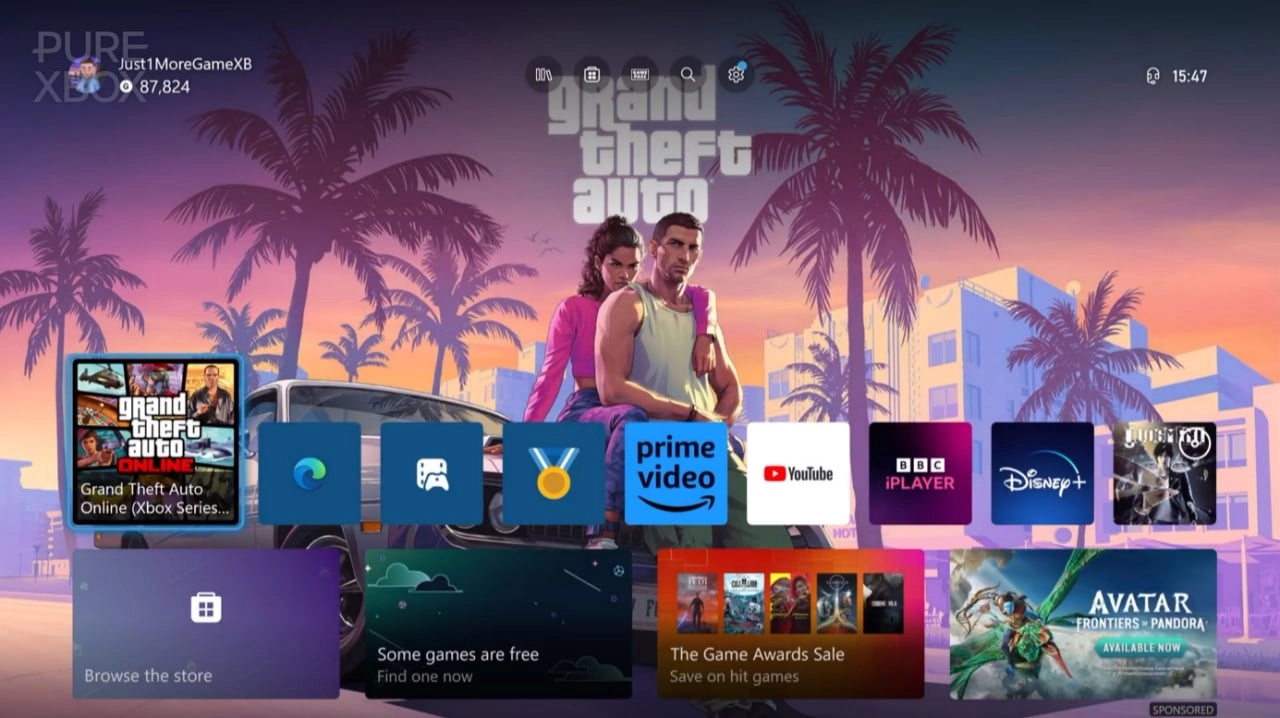
Xbox players can now elevate their gaming experience by personalizing their background screens. The process is straightforward and allows for a wide range of custom imagery, so whether you're a fan of the highly anticipated Grand Theft Auto VI or have another favorite game, film, or band, the option to transform your Xbox console's aesthetic to match your preferences is now available.
With the release of new artwork for GTA 6, fans can showcase their excitement by setting these images as their Xbox dashboard backgrounds. This customization is possible on both Xbox Series X and Xbox Series S consoles. The method utilizes the built-in Microsoft Edge browser on the console, empowering users to select their desired image with ease.
To start the process, turn on your console and navigate to the Microsoft Edge browser. Once loaded, search for the image you wish to use as your background. This could be the new GTA 6 artwork or any high-resolution image from your favorite entertainment medium. When you've chosen the image, simply hover the cursor over it and press the Menu button on the Xbox controller, identifiable by its three horizontal lines. A sub-menu will appear where you should select "Set as Background."
This feature usually works well with most websites, granting you the freedom to choose virtually any image to be your new background. However, it's important to note that some websites may have limitations or issues when attempting to use their imagery. Additionally, while choosing your image, remind yourself that it must be of high quality. A low-resolution picture may render as blurry or pixelated on your home screen, thus diminishing the visual appeal of your custom background.
High-definition images look especially striking, and the GTA 6 artwork, available in logo and non-logo versions, is an excellent choice for gaming enthusiasts. The detail, color, and vibrancy of these artworks are perfect for showcasing on your Xbox background, immersing you further into the gaming realm even before you launch a game.
Once you've set your new background, you can return to this process anytime to update your image with new artwork, keeping your Xbox interface feeling fresh and expressive of your current interests or gaming obsessions. This customization feature adds a layer of personality to your console, inviting you to make the system truly your own.
The Xbox community has welcomed this opportunity to personalize their consoles. Players share their backgrounds, exchanging images of their favorite games or pop culture icons. This feature not only enhances the individual user's experience but also fosters a sense of connection among gamers, often leading to discussions about shared interests and discovering new art or games.
It's exciting to consider how custom backgrounds will continue to evolve with future Xbox updates. Microsoft's commitment to personalization and creativity within their console ecosystem ensures that your Xbox experience is uniquely your own.
In addition to custom backgrounds, Xbox frequently updates its platform with new features and services. For example, the development of the Xbox Game Pass 'Friends & Family' Plan and the addition of new games to the Xbox Game Pass list showcase the evolving canvas of Xbox offerings. Not to mention, Xbox celebrates new games and milestones with thematic dynamic backgrounds, too.
Whether you choose to keep the GTA 6 artwork as your background for a long period or you periodically switch it out with something new, the essence of this feature is that it allows you to make your Xbox your personal gaming haven. Let your console be a reflection of your passions and a canvas for your favorite visual art, igniting the excitement for your gaming sessions each time you power on your Xbox.

You must be logged in to post a comment!